Author: adaptiman

  • Communication Issues

    Communication Issues

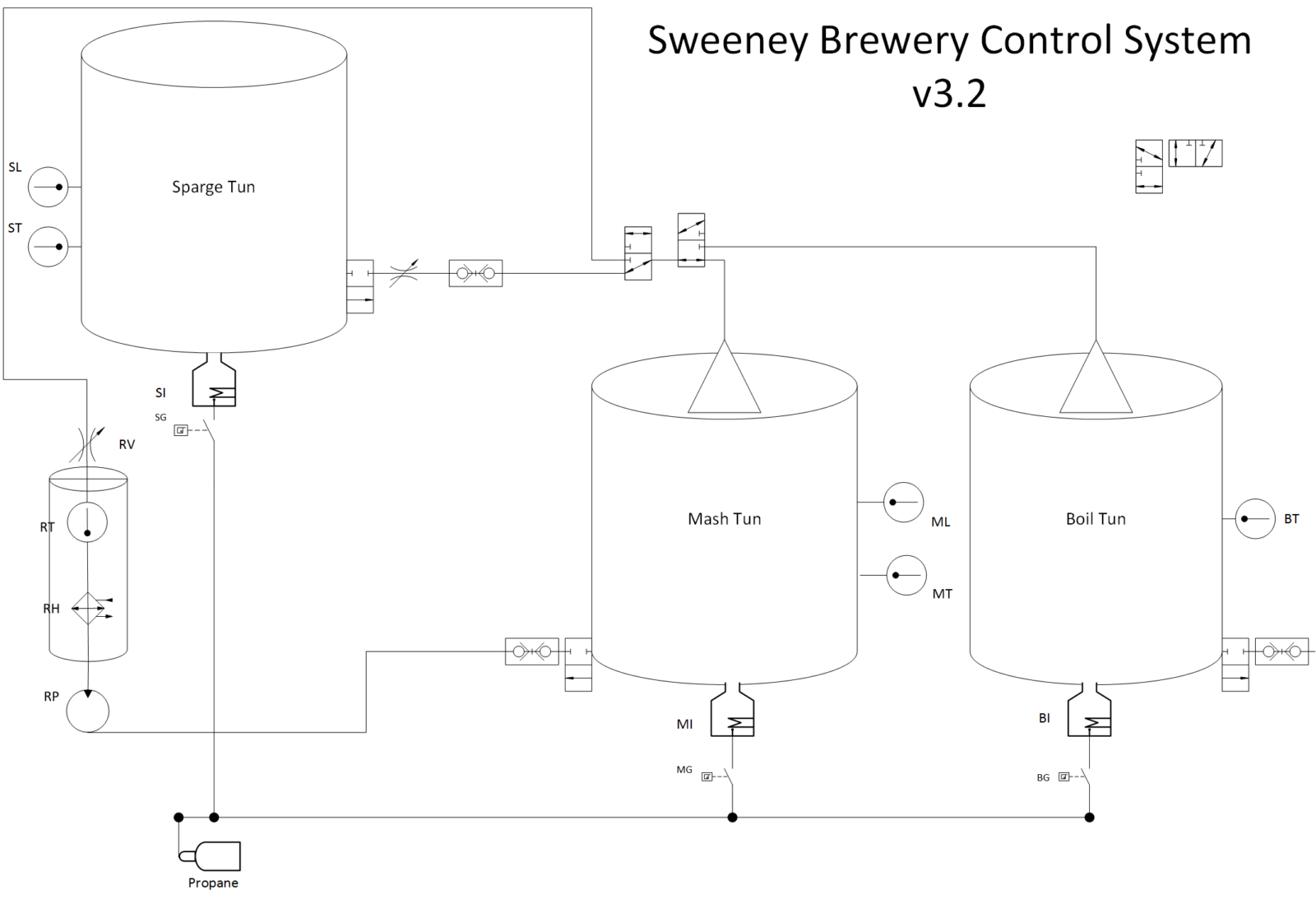
    The Sweeney Brewery v3 has lots of electrical controls. I have six 2-way electric ball valves – three for tun control and three for gas control, and two 3-way valves for various fluid routing processes. I also have a new Omega CN7500 (more on that later),  and the system pump.

    Controlling everything, I have an RPi v2. The first problem was how to control all of the devices. the RPi offers support for multiple communication protocols including one-wire, RS232, RS485, and lots of others. After flirting with one-wire, I settled on RS485 for several reasons. First, the Omega could communicate with either RS232 or RS485. I had to design the controllers for the electric ball valves from scratch, so that wasn’t a limiting factor. RS485 can also support up to 32 devices per communications port. Also, RS485 can communicate over long distances. These all added up to a design decision to use RS485.

    There’s lots of information on using RS485 with RPi – most of it poorly written, erroneous, or just plain wrong. I went down the road of trying to get the RPi to control RS485 directly but soon gave that up because of voltage conversions.  Then I found a neat little RPi shield that takes care of the voltage shifting for you. This was the solution that would allow me to control both the Omega PID and an array of relays that could control the mechanical controls.

    And so I set out to configure the RPi to communicate to the serial devices. This was NOT easy. I installed a minimal Raspbian image (September 2016, Kernel 4.4) and updated all packages. I setup SSH and a USB wireless dongle to communicate with my house network so I could work on the RPi headless. I then added the following additional packages using apt-get:

    1. vim
    2. git-core
    3. python-pip
    4. wiringpi
    5. python-serial

    This package should be installed with pip:

    1. minimalmodbus (has a custom driver for the Omega CN7500!!)

    The setup instructions for the LinkSprite shield are old (2013) and inaccurate. They detail the following tasks which have to be modified on the new systemd enabled Raspbian image.

    1. Install library dependencies (detailed above)
    2. Disable use of the serial port as a TTY. Use raspi-config to do this. Run sudo raspi-config and check if it has the option interfacing-options -> serial. If it has, set it to disabled and you’re done.
    3. Set the serial GPIO flags to ALT0:
      gpio readall
      gpio mode 15 ALT0; gpio mode 16 ALT0
      gpio readall

      You should now see pins 15 and 16 set to ALT0.

    4. Disable the login messages on the serial port. This is tricky because the instructions assume an old version of unix that uses SystemV (i.e., edit /etc/inittab). The newest version of Raspbian uses systemd, which doesn’t have /etc/inittab. The correct way to do this under systemd is to run:
      sudo systemctl mask serial-getty@ttyAMA0.service

    After I took these steps, I was able to communicate to the Omega controller via a simple python script that extended the custom Omega CN7500 driver for python. Here’s the simple script which returns the current process temp from the controller:

    #!/usr/bin/env python
    import omegacn7500
    instrument = omegacn7500.OmegaCN7500('/dev/ttyAMA0', 2) # port name, slave address
    print instrument.get_pv() # print temperature

    And so, I made my first successful RS485 communication. More to follow.

    RPi3 Update

    Well, it turns out that the steps to enable the RS485 on the RPi3 are different. I found an article that deals with much of the subtlety of this. Because of the addition of bluetooth on the RPi3, /dev/ttyAMA0 is reserved for that, and so the procedure is slightly different. In the following steps, we will move bluetooth from the high-performance /dev/ttyAMA0 interface to the lower performing /dev/ttyS0.

    Raspberry Pi 3’s and 4’s are great little beasts, and add Bluetooth, yay! However, in order to use the Bluetooth correctly the /dev/ttyAMA0 has been “stolen” from the GPIO header and an inferior second one has been substituted in it’s place. No-one will ever know! Unfortunately /dev/ttyAMA0 was a hardware serial port (uart) and high performance (hence it was nabbed for the Bluetooth) and the second port is partly software and a bit flaky. Many people’s applications got broken.

    The second serial port you will see referred to as the “mini uart” and lives at /dev/ttyS0. It also calculates it’s bit timing’s from the CPU cores frequency and if the CPU is under heavy load it can corrupt the serial communications. Not good.

    In order to work around this, many people “fix” the CPU core frequency so that the serial port is stable. This comes at a slight loss in performance (though normally not noticeable). I’ll describe how you do this in the next section.

    To summarize, the default ports on a Raspberry Pi 3 / 4 and be crystal clear:

    /dev/ttyAMA0 -> Bluetooth
    /dev/ttyS0 -> GPIO serial port.

    If you stick with these as is, your Bluetooth will work as nature intended AND you can use a serial port over the GPIO (there is a way of swapping the serial ports around if you don’t want to use the Bluetooth and I’ll cover that at the end of this post).

    Enabling

    There is yet another wrinkle in that in the latest Jessie / Stretch / Buster releases (as of August 2019) the GPIO serial port is disabled by default. In order to enable it, edit config.txt:

    $ sudo nano /boot/config.txt

    and add the line (at the bottom):

    enable_uart=1
    

    As of May 2016 this will also lock the cpu core frequency for you so there’s nothing else you need to do (If you aren’t convinced and you really like to belt and braces it the command is: core_freq=250 which you add to the same file as well).

    Reboot for the changes to take effect.

    This should get you good serial communications for most uses.

    Serial Aliases

    On the Raspberry Pi 3 the second serial port is called /dev/ttyS0 and is by default mapped to the GPIO pins 14 and 15. So immediately, if you have code that references /dev/ttyAMA0 you’re going to have problems and things aren’t going to work.

    You could go through your code and replace ttyAMA0 with ttyS0 and that should work. However, if you find yourself use the same SD card on a Raspberry Pi other than a rpi3 your code won’t work again.

    In order to try and get around this the Foundation have introduced a serial port alias (as of May 2016 – 2016-05-10). Thus you have serial ports: serial0 and serial1 (rpi3). The Raspberry Pi kernel sorts out where these point to depending on which Raspberry Pi you are on. Thus on a Raspberry Pi 3 / 4 serial0 will point to GPIO pins 14 and 15 and use the “mini-uart” aka /dev/ttyS0. On other Raspberry Pi’s  it will point to the hardware UART and /dev/ttyAMA0.

    To find out where it is pointing you can use the command:

    $ ls -l /dev | grep serial

    
    Default Raspberry PI 3 / 4 serial port aliases

    So where possible refer to the serial port via it’s alias of “serial0” and your code should work on both Raspberry Pi 3 / 4’s and other Raspberry Pi’s.

    Disabling the Console

    If you are using the serial port for anything other than the console you need to disable it. This will be slightly different depending on whether you are running a Raspberry Pi 3 / 4 or not.

    For non Raspberry Pi 3 / 4 machines, remember it’s /dev/ttyAMA0 that is linked to the getty (console) service. So you need to perform this command from a terminal window:

    $ sudo systemctl stop serial-getty@ttyAMA0.service
    $ sudo systemctl disable serial-getty@ttyAMA0.service
    

    The “disable” will stop it loading in the future.

    For Raspberry Pi 3’s the command is similar but referencing /dev/ttyS0:

    $ sudo systemctl stop serial-getty@ttyS0.service
    $ sudo systemctl disable serial-getty@ttyS0.service
    

    You also need to remove the console from the cmdline.txt. If you edit this with:

    $ sudo nano /boot/cmdline.txt
    

    you will see something like:

    dwc_otg.lpm_enable=0 console=serial0,115200 console=tty1 root=/dev/mmcblk0p2 rootfstype=ext4 elevator=deadline fsck.repair=yes root wait

    remove the line: console=serial0,115200 and save and reboot for changes to take effect.

    Swapping the Serial Ports on Raspberry Pi 3 / 4

    What if you don’t want to use the Bluetooth and you want that high performance /dev/ttyAMA0 back on the GPIO? Well you can do this and the way you do this is via a device overlay called “pi3-miniuart-bt” i.e. use the mini-uart (/dev/ttyS0) for Bluetooth (you may get some loss of performance on your Bluetooth though).

    You can also just disable the Bluetooth all together by using another overlay “pi3-disable-bt”. In both cases if you can find out more of what they do here: /boot/overlays/README

    To use add the following line to the /boot/config.txt

    $ sudo nano /boot/config.txt
    

    and add:

    dtoverlay=pi3-miniuart-bt
    

    Save and reboot for changes to take effect.

    You can check that it has worked by:

    $ ls -l /dev
    

    and you’ll see something like this:

    Swapped Raspberry PI 3 serial port aliases
    Swapped Raspberry PI 3 / 4 serial port aliases
  • Sweeney Brewery v3 Kickoff

    Sweeney Brewery v3 Kickoff

    Almost 21 years ago, my oldest daughter, Kathryn was born. The night before she was born, I brewed my first batch of beer. It was an American Pale Ale extract recipe that I cooked up on the stove. That batch was to kickoff a lifelong hobby that has taken me through many engineering adventures leading up to my current enterprise.

    After several years of extract brewing on the stove, I got fancy and built a three vessel two tier brewing system. The showpiece of version 2 was a Recirculating Infusion Mash System (RIMS). This brewing technique creates a pumped loop in the mash tun that takes sweet wort from the bottom of the grainbed, heats it up to mashing temps, and recirculates it to the top of the grain bed gently via a manifold. The technique does indeed work, increase the overall yield of the mash and setting the grain bed over an hour resulting in crystal clear sweet wort entering the boil vessel.

    Version 2 RIMS was controlled by an Omega CN9522-C2 PID controller. This small embedded computing device takes a temp input from the loop, and then uses a pulse across a solid-state relay to heat a hot-water heater coil in the RIMS before it gets recirculated. The only other electrical “thing” in the system was my Little Giant MD2-HC corrosive liquid pump. So the instrument box contained two waterproof light switches (one for power and one for the pump) and the Omega controller. Everything else in version 2 rig was manual. I had tri-clover clamps, brewing hose, and copper lines connecting everything together.

    I used v2 happily for more than 15 years. Several years ago, I “got busy” with work, school, church, scouts, and life, resulting in a brewing hiatus for the last 4 years. But two things have happened lately to get me started back into my beloved hobby. First, a friend of mine opened a wood-fired pizza shop several miles out of town. Having tasted my homebrew before, he asked if I was interested in making some beer for his weekend pizza fanatics. This by itself wouldn’t have gotten me started, but Kathryn came to me several months ago and asked if I could make a batch for her 21st birthday (in December). She wanted the same recipe I made the night before she was born. Well, how can I turn that down?

    And so, the journey starts. My goal in version 3 is to control the RIMS and all flow control with a Raspberry Pi. There are several reasons for doing this. First, it’s fun. This project encompasses mechanical, fluid, electrical, and software engineering. Second, no one has done it the way I’m going to do it. Third, by extending some new technologies like Internet of Things (IOT), I can do some neat stuff with the controls (eventually).

    So this thread will include a diary of my Sweeney Brewery Version 3 adventure. Sometimes, I’m sure it will get tedious as I recount details so that others following behind me can duplicate the work. But it should be an interesting exercise, hopefully not in futility.

  • Estimating Business Value

    Estimating Business Value

    I recently read The Art of Business Value by Mark Schwartz. In this brilliant read, the author asserts that not only is business value an ill-defined term in the Agile literature, even if we could define it clearly, how do we estimate it? For example, one of the Agile PM mantras states that the backlog of user stories is prioritized by the product owner according to “business value.” But how does she determine what this is?

    Far too often in Agile projects, I’ve seen teams create a “vomit of user stories” first, and then try to estimate the value of these stories, assuming that the “golden nuggets” of business value will be among them. This seems to be putting the cart before the horse. Wouldn’t it be more efficient and strategically aligned to determine what is valued by the business FIRST and then write user stories to satisfy that value?

    And even if we are able to determine what is valued by the business, it is almost never stated at such an atomic level as feature X  for product Y. When you look at the business value mantra of Agile closely, it’s not as well defined as we’ve thought all these years. Perhaps we’ve been reciting the mantra over and over without really understanding what it means.

    I think we (IT and customers) need to spend more time looking at what business value REALLY MEANS in our environment. I’m not sure we have been doing a good of estimating the value of our stories.

  • DevOps and Higher Ed

    DevOps and Higher Ed

    A colleague of mine, who is another division-level IT manager, and I are teaching a course in the fall. The course is a senior level elective that focuses on special topics in technology management. Cool – right up our alley. We were given freedom to pick the topic, and of course we chose DevOps. You may have heard of it. It has become trendy is recent years, but I think it will prove to be more than a passing fad. You see, DevOps tries to solve problems, not primarily with technology, but rather with organizational functioning and communication.

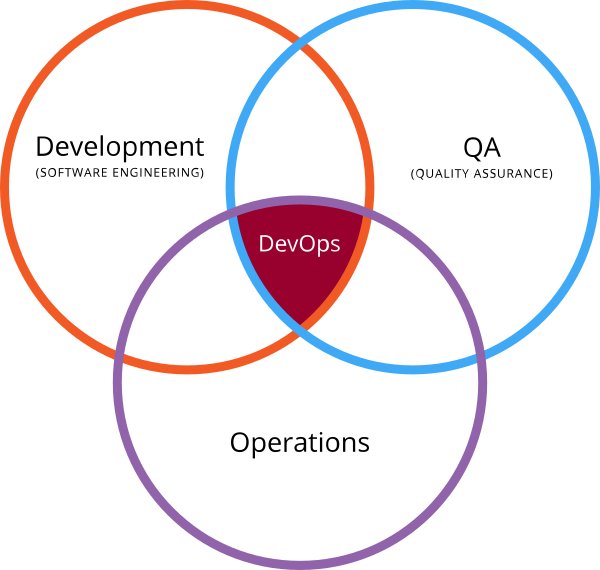
    The traditional definition of DevOps describes the intersection of communication and automation between IT development, operations and quality assurance. While these three areas are classically highlighted as the main areas of focus, in truth, DevOps is a set of principles for all of the IT disciplines. Recent sources have described DevOps as a philosophy for approaching IT work based upon four pillars; collaboration, affinity, tools, and scaling (cf. Davis & Daniels, 2016. Effective DevOps: Building a Culture of Collaboration, Affinity, and Tooling at Scale). More accurately, I think of DevOps as an organizational culture. Sure, part of DevOps is tools that enhance automation, communication, and collaboration. In fact, most people mistakenly talk about how to “do DevOps” and usually focus on tools. But what I find extremely useful is the push to break down organizational silos and embrace shared responsibility and authority across the organization.

    Here’s the interesting part. As we have been trying to introduce DevOps into the work that we do here at the big school, we are finding that the organizational structure of a large Tier 1 University (or most any other higher education institution for that matter) is the antithesis of a DevOps culture. Higher education embraces vertical structures of organization and authority, delineated responsibility, demarcated services, territorial imbroglios, and  finger-pointing when things go south. In IT, we see this among our IT organizations, between us and our customers, and even between organizations with a common purpose like academic colleges.

    That is why I think DevOps is so important for Higher Ed IT. It gives us a framework to finally address some of the serious shortcomings of our environments in a way that will prove our worth to the academy. If we can only get over our historical cultures and shift our thinking, I think we can take Higher Ed IT to the next level using principles of DevOps.


  • Political Quandry

    Political Quandry

    “I will never vote for Donald Trump.” That’s a direct quote from your’s truly in February of this year. But as a middle-aged white guy, I also remember the Clinton years. For those of you from that vintage, you remember; Whitewater, Monica Lewinsky, Hillary Healthcare version one, impeachment, Vince Foster – you get the picture. I’m not trying to impugn Hillary for the behavior of Bill. It just seems that 1) controversy and scandal follow the Clintons and 2) their explanations don’t seem to ring true. I see them as the prototypes for Frank and Claire Underwood. For Hillary’s part, the Benghazi explanation really stretched credibility. The email scandal, while probably blown out of proportion by critics, reached new heights of spin (to be charitable) or lying (to be honest).

    It really doesn’t matter, though. As negative as I am about the Clintons and the Democratic Party in general, I was done with the Republican Party with the second Obama term. I figured if they couldn’t beat Obama after his first term performance, they had truly lost their way. They have confirmed my assessment by creating Trump. That’s right – I said the Republican Party created Trump. He is a natural outcome of outrage from the party of Lincoln really not having a clue how to win. I mean, REALLY. If the best the party can field is Jeb Bush, we have a problem. Cruz and Rubio don’t count as as they are not true Republicans. Even if we go back to Mitt Romney, while a fine man, he wasn’t the kind of leader we needed. And to lose to Obama after a first term liberal performance reminiscent of French politicians but not as stylish, the Republican Party is dead.

    So what is a fiscally conservative, socially moderate (except when it comes to the sanctity of life), environmentally liberal voter supposed to do? Our electoral system is so skewed toward the two-party system that third-party candidates are not taken seriously. The Libertarian and Green Parties are really out there. Should I write someone in? Elmer Fudd perhaps? Should I make a political statement by throwing away my vote? Texas will undoubtedly go to Big Hair. I don’t know that I can vote for either The Donald or Hillary without feeling shame. Maybe I’ll stay home that day.

  • Doris Mae Sweeney, 1944-2016

    Doris Mae Sweeney, 1944-2016

    My mother, Doris Mae Staton Sweeney, passed way early in the morning on Saturday, May 21st, 2016. She died in her sleep after having a nice dinner with her husband and friends at a local restaurant. She had been working in the garden on Friday pulling weeds. Her Easter lilies had started to bloom and she was very proud of them. There was nothing wrong with her other than the common ailments of anyone 72 years old. She wasn’t feeling ill. I had spoken with her on the phone that night. She asked me about my dissertation proposal, and finished the conversation with a simple “I love you.” That night, she simply passed away, peacefully, in her sleep. (more…)

  • Grow Your Own

    The speed of change in IT is dizzying. Exciting, but dizzying. Sometimes it feels that we move so fast, we can’t even get introduced to a new process or service before it changes. Other IT shops seem to be feeling the pressure as well. Here’s an example: an article titled Are 18-month org charts and constant training the new reality for IT? Dr. Carver makes the case that truly agile organizations can’t look out ten, five, or even three years – IT rolls over every eighteen months, so be prepared. (more…)

  • Purpose, Principles and Systems

    I just saw a new webinar from the Lean IT Association called Lean IT in Action -A Tale of Two IT Transformations. Very interesting. The basic premise of the webinar is that organizational transformation takes time and commitment at all levels. It takes holding employees responsible for carrying out the commitment. It means doing the hard work first, even if it’s not fun or sexy. Here are some examples. (more…)