NIS recently published an updated strategic plan. High-level objectives include:
- Move Toward a Cloud-First Environment
- Support Mobile-First Computing
- Support Research Computing
- Develop NIS Staff
- Mature IT Service Management Practices
NIS recently published an updated strategic plan. High-level objectives include:

I was browsing some articles on organizational change and came across this nice summary on Pink Elephant. The statistic that jumped out at me was that 70% of change initiatives fail. The article goes on to assert two main causes for these failures:
According to the article, “Many organizations focus on the first reason and totally ignore the second.” When I consider where IT needs work in leading change, #2 sticks out to me. So, how can I effectively guide the agency?
In my Technology Management Capstone course, one of the models I teach my students is John Kotter’s model of organizational change management, which is arguably the most famous model ever for leading an organization through change. Kotter’s book, Our Iceberg is Melting, is a classic in Industrial/Organizational Psychology. Kotter’s model consists of eight steps:
Notice that most of the work happens before the the change is instituted. Kotter’s steps are a good way to make sure that the organization has sufficient buy-in and sustainability to carry out the fast-paced changes we have to achieve in IT.
I’ve been thinking a lot lately about Hanlon’s Razor. This adage states that one should never attribute to malice that which is adequately explained by stupidity. I would re-frame stupidity to be ignorance that results in poor communication. Indeed, most people, when kept in the dark about an issue that may affect them, tend to attribute nefarious intentions to the poor communicator. But I’ve found that rarely are the motives iniquitous. Rather, it is far more common for the communicator to simply not realize their messaging may be poor, their plans not communicated effectively, their intentions not transparent.
This is important in many fields of human endeavor, including IT. Followup communication on incidents and service requests frequently fall victim to time poverty on both sides, confusing written (i.e., email) responses, and technical jargon. While IT strives to improve in this area, I’m perturbed that sometimes it seems as if we make little headway to make our communication better and more transparent. It is a never-ending battle.
Happily, good communication and transparency can be taught – they are skills one may learn. Recognition of the psychological issues are the first step. Assessment, process, and practice are the methods to improve them.
So, the next time you’re in a poor communication situation, don’t assume the worst. Consider that the other may simply not realize that the message is unclear or has been lost.
Misunderstandings and lethargy perhaps produce more wrong in the world than deceit and malice do. At least the latter two are certainly rarer.
Goethe. J. W. (1774). The sorrows of young werther (as translated).
As we return to the office, cyber threat actors are changing their tactics as they did during the work from home transition. Here at TTI, we’ve seen a number of these sophisticated attacks that attempt to redirect victims to a site to enter their credentials. But the site is NOT our Microsoft login site.
The latest scam includes pelting recipients with emails purportedly from their CIOs or other highly placed executive welcoming employees back into offices. Threat Post indicates that the fake CIO email prompts victims to link to a fake Microsoft SharePoint page with two company-branded documents, both outlining new business operations. However, if a victim decides to interact (click) on either document a login panel appears and prompts the recipient to provide login credentials to access the files.
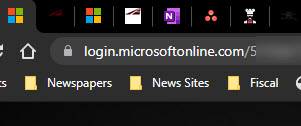
Whenever you enter credentials in a browser window, be sure that the address of the site is login.microsoftonline.com/… AND that there is a lock icon next to the address, like this:

Quite a few folks have told me that they were a little confused the last time they tried to show a PowerPoint display in MS Teams. Recently, the application was upgraded to allow presenters more control over presentation mode than just simply sharing their screen or PowerPoint app. This tutorial by the MS Education Team talks about this new feature and a few others that were recently released.
Welcome back to the office. Is your office phone forwarded to your mobile? Did you forget how to “un-forward it?” Here’s a refresher on how to forward and un-forward your office phone.


A recent conversation with our Chief Information Security Officer impressed upon me the importance of protecting my credit. He talked about how his social security number and other protected information were sold on the dark web which led to problems with his credit and bank accounts. He went through the process of freezing his credit reports and bank account information, which gives a layer of protection against identity theft. This prevents bad actors from opening credit accounts and taking out loans in your name. Fixing these kinds of problems after the fact can be very difficult.
According to Experian, a credit freeze, also known as a security freeze, is a tool designed to help protect you from fraud and identity theft. It limits access to your credit report unless you lift the freeze, or “thaw” your credit. Having a freeze in place won’t affect your credit scores, but it will prevent your credit report from being accessed to calculate scores unless you first lift the freeze.
So I asked Brad for more information, and he was kind enough to send me a list of steps to do this. While he was doing this to stop further compromise of his information, he stressed that proactively freezing your credit and utility accounts can prevent problems before they start.
CAVEAT!
Freezing your accounts creates an inconvenience when you or a creditor need to access them. You have to unfreeze them prior to applying for a loan, or some other form of credit. Not a big deal, but be aware. Sometimes unfreezing a report can take several days. In some cases (such as ChexSystem) you will have to keep up with a PIN they send you to unfreeze the account in the future.
In order to freeze your accounts, take the following steps:

Brrrrrr!
I don’t remember it being this cold ever, and I’ve been living in Texas my whole life. Like you, I’ve been adapting to the cold weather over the last several days. My numerous cats (I won’t say how many) are doing gymnastics in the upstairs classroom, my chickens are getting warm bowls of water every few hours, and my dog is enjoying the relative warmth of the laundry room. Candles have been collected and dusted off, ready for use this evening. Dinner will be a quick Mediterranean shrimp stew using a cast iron skillet and my propane stove. All in all, we are comfortable, not too inconvenienced.
One area this doesn’t extend to is work. I live in the country and so have very poor network connections. My house uses DSL from Centurylink (wouldn’t wish it on my worst enemy). Until recently, this was the best game in town. But my local co-op electricity provider has decided to provide fiber-based broadband to its subscribers. It advertises speeds up to 1GBps – we’ll see if they can deliver. After a series of scheduling fiascos and installing the fiber box in the wrong location, they were due to install it last Friday before all of this bad weather hit but didn’t quite make it. So it looks like I missed it by a few days. Rats!
Even so, I had purchased wireless hotspot service on my mobile phone to use in emergencies. While the service can provide speeds up to 10 MBps, that requires a good wireless signal, and my house doesn’t always get that signal.
I started out naively using my normal desktop workstation in my home office, but the constant on and off of the power made it clear that using the DSL/desktop solution wasn’t going to work. So, with a few rerouted wires, I hooked up my laptop to an external monitor and fired up my mobile phone hotspot – voila! Now I’m “immune” from rolling power outs although throughput is limited. When the power is out, the battery in my laptop and phone keep things going. I was sure to also hook up the chargers so that they would charge when the power was on.
Things are still not working as well as I would like. For one, even with the hotspot connection, DNS lookups (i.e., website locations) fail regularly, the hotspot has a tendency to disconnect, and sometimes the throughput crawls to 10KBps making even simple tasks such as loading and sending email difficult.
What’s the lesson learned? Connectivity counts! TTI has a small task force working on connectivity recommendations post-COVID. I’m looking forward to implementing those recommendations as we move forward.
In the meantime, please pass the hot cocoa!